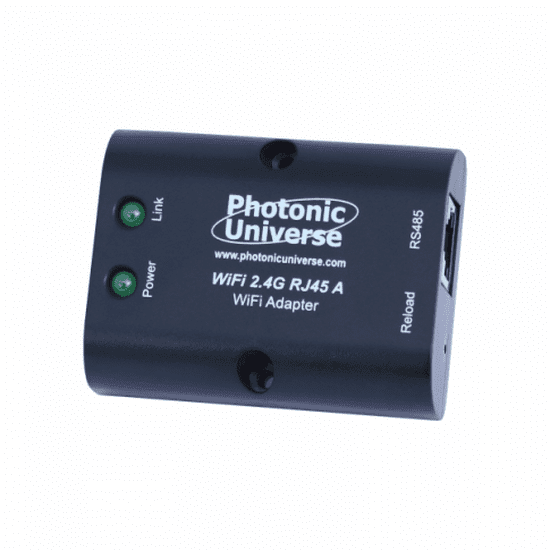
Wi-Fi module for monitoring and programming a solar charge controller through the mobile app (includes 1.9m cable)
Wi-Fi module for monitoring and programming a solar charge controller through the mobile app (includes 1.9m cable)
SKU:EBOX-WIFI
Our stock levels are dynamic and can change frequently. If a product appears to be in stock, it may have already sold out. Please contact us if you have any questions about availability. Thank you for your understanding.
Couldn't load pickup availability
Wi-Fi Module for Solar Charge Controller Monitoring
EBOX-WIFI | Remote App Control & Programming | 1.9m Cable
The Photonic Universe EBOX-WIFI module provides a convenient way to monitor and program compatible solar charge controllers directly from your mobile phone. This accessory creates a local Wi-Fi network, allowing you to connect via the free Solar Station app to access real-time system data and adjust key settings.
Designed for ease of use, the EBOX-WIFI module plugs into your solar charge controller, offering enhanced control over your solar power system. It is supplied with a 1.9m RJ45 cable for straightforward connection.
COMPATIBILITY NOTE: This module is not suitable for dual battery solar charge controllers.
Key Features
| ▶ Remote Monitoring — View solar panel, battery, and load parameters in real-time. |
| ▶ System Programming — Adjust charging and load settings via the mobile app. |
| ▶ Wide Compatibility — Works with Tracer TR/PTR, VS****BN, LS**24B, and PU series controllers. |
| ▶ Local Wi-Fi Network — Creates a direct connection for reliable communication up to 50m. |
| ▶ Low Power Consumption — Efficient operation with minimal self-consumption. |
| ▶ Easy Installation — Plugs directly into compatible controllers with a 1.9m RJ45 cable. |
Technical Specifications
| Parameter | Value |
|---|---|
| Model | EBOX-WIFI |
| Manufacturer | Photonic Universe |
| Wi-Fi Radius | 50m |
| Cable Length | 1.9m |
| Connection Type | RJ45 |
| Self-Consumption (Standby) | 0.2W |
| Self-Consumption (Operation) | 0.25W |
| Port Baud Rate | 300bps-230400bps (default 115200bps) |
| Enclosure Rating | IP30 |
| Dimensions (L x W x H) | 51 x 67 x 24.5mm |
| Weight | 40g |
App Functionality & Customisation
The Solar Station mobile app, available for iOS and Android, unlocks comprehensive control and monitoring capabilities for your solar system.
| Feature | Description |
|---|---|
| Real-time Data Display | Monitor voltage, current (solar panel/load), battery state of charge, and more. |
| Historical Data Storage | View accumulated charge/discharge energy and min/max voltage readings. |
| Battery Type & Capacity | Amend battery type and capacity settings to match your specific battery bank. |
| Charging Stage Customisation | Select charging voltages and specify durations for different charging stages. |
| User-Defined Battery | Create custom battery types with specific charging parameters if pre-existing options are unsuitable. |
Typical Applications
| Application | Description |
|---|---|
| Off-Grid Solar Systems | Monitor and adjust charge controller settings for cabins, remote homes, and caravans. |
| RV & Marine Installations | Conveniently check battery status and solar input from inside your vehicle or boat. |
| Small Business & Shed Power | Optimise charging parameters for battery banks powering tools, lighting, or security systems. |
Enclosure & Design Features
The EBOX-WIFI module features an IP30 rated enclosure, providing protection against solid objects larger than 2.5mm. Its compact dimensions (51 x 67 x 24.5mm) and lightweight design (40g) make it easy to integrate into existing solar setups. LED indicators clearly show power and network status, while pre-drilled mounting holes simplify installation.
Common Questions
What is the "Solar Station" app?
The Solar Station app is a free mobile application for iOS and Android devices that allows you to connect to the EBOX-WIFI module. It provides a user-friendly interface for monitoring your solar charge controller's performance and adjusting its settings remotely.
Can I use a different cable length?
The EBOX-WIFI module comes with a 1.9m RJ45 cable. While this cable can be replaced with a shorter or longer standard RJ45 connection cable, ensure the replacement cable is of suitable quality for reliable communication.
Is an additional cable needed for RS485 controllers?
Yes, for solar charge controllers equipped with an RS485 port, an additional RS485 to RJ45 cable will be required to connect the EBOX-WIFI module. Please check your controller's specifications.
What does IP30 mean?
An IP30 rating indicates that the enclosure is protected against solid objects larger than 2.5mm, such as tools or thick wires. It does not provide protection against water or other liquids.
Installation Notes
- Ensure your solar charge controller is compatible with the EBOX-WIFI module (Tracer TR/PTR, VS****BN, LS**24B, PU series).
- Connect the module to the designated port on your charge controller using the supplied 1.9m RJ45 cable.
- For controllers with an RS485 port, an additional RS485 to RJ45 cable is required.
- Mount the module in a dry, protected location, considering its IP30 rating.
- Download the Solar Station app from your mobile device's app store.
Before You Buy
- Verify your solar charge controller model against the compatibility list.
- Confirm if your controller has an RJ45 or RS485 port to determine if an additional cable is needed.
- Note that this module is not suitable for dual battery solar charge controllers.
- Ensure you have a smartphone (iOS or Android) to use the Solar Station app.
- Consider the 50m Wi-Fi radius for optimal placement of the module and your monitoring device.
Please verify all specifications and compatibility requirements with your existing solar system components before purchase. Product details are based on manufacturer information.
Share