
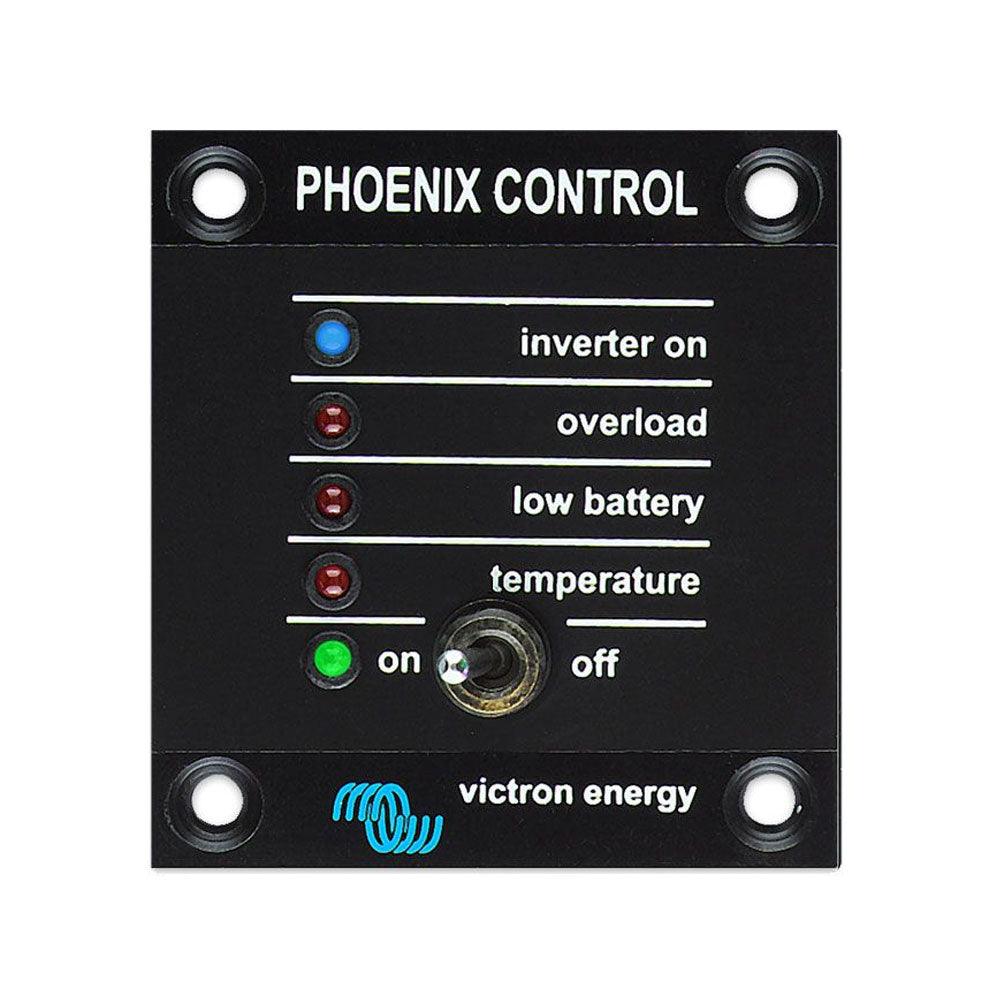
Victron REC030001210 Phoenix Inverter Control
Victron REC030001210 Phoenix Inverter Control
SKU:792-REC030001210
Our stock levels are dynamic and can change frequently. If a product appears to be in stock, it may have already sold out. Please contact us if you have any questions about availability. Thank you for your understanding.
Couldn't load pickup availability
Victron Phoenix Inverter Control Panel
Remote Monitoring & Control | UTP Socket Connectivity
The Victron REC030001210 Phoenix Inverter Control panel offers convenient remote monitoring and control for compatible Victron Phoenix Inverters. This essential accessory allows users to manage their inverter's operation from a dedicated location, providing flexibility for various installations, including off-grid systems, marine, and RV applications.
Designed for seamless integration, the panel connects via a UTP remote monitoring and control socket, ensuring reliable communication with your inverter. It also features an automatic LED brightness reduction function, optimising visibility and comfort, especially during night-time use.
COMPATIBILITY NOTE: This panel is specifically for Phoenix Inverters equipped with a UTP remote socket. It can also be used with MultiPlus Inverter/Chargers when only an automatic transfer switch function is desired, without the charger function.
Key Features
| ▶ Remote Control & Monitoring — Provides convenient remote operation and status feedback for your Victron inverter. |
| ▶ UTP Socket Connectivity — Ensures simple and reliable plug-and-play connection to compatible inverters using a standard UTP (RJ45) cable. |
| ▶ Automatic LED Dimming — LED brightness automatically reduces during night-time for comfortable viewing and reduced power consumption. |
| ▶ Multi-Function Control — Offers remote On/Off and "Charger Only" mode selection for flexible power management. |
| ▶ Compact & Robust Design — Space-efficient form factor suitable for integration into various control panels and dashboards. |
Technical Specifications
| Parameter | Value |
|---|---|
| Model | REC030001210 |
| Manufacturer | Victron Energy |
| Product Type | Inverter Control Panel |
| Connection Interface | UTP (RJ45) Remote Socket |
| Control Functions | On/Off, Charger Only Mode |
| Display Features | LED Status Indicators, Auto-Dimming LEDs |
| Compatible Inverters | Phoenix Inverters (with UTP socket), Specific MultiPlus models |
Operating & Control Functions
The Victron Phoenix Inverter Control panel provides essential functions for managing your power system. It allows you to remotely switch your compatible Phoenix Inverter On or Off, offering convenience when the inverter is installed in a less accessible location.
For MultiPlus Inverter/Charger units, this panel can be utilised to enable the automatic transfer switch function while disabling the charging capabilities, providing flexibility for specific system configurations. The integrated LED indicators offer clear visual feedback on the inverter's operational status, ensuring you are always informed.
A notable feature is the automatic reduction of LED brightness during night-time, which helps to conserve energy and prevents unnecessary light pollution in sensitive environments like cabins or bedrooms.
Typical Applications
| Application | Description |
|---|---|
| Off-Grid Systems | Enables remote control of Phoenix inverters in cabins, sheds, or other remote installations. |
| Marine & RV | Provides convenient access to inverter controls from a dashboard or cabin panel in boats and recreational vehicles. |
| Backup Power Systems | Allows easy monitoring and control of backup inverters without needing direct access to the unit. |
| Small Commercial Installations | Facilitates centralised control and status checks for Victron inverter setups in small business environments. |
Common Questions
What Victron inverters is this control panel compatible with?
This control panel is compatible with Victron Phoenix Inverters that are equipped with a UTP remote monitoring and control socket. It also works with specific MultiPlus Inverter/Charger models (12/1200, 12/1600, 12/2000, 12/3000, 12/5000, 24/1200, 24/1600, 24/2000, 24/3000, 24/5000, 48/3000, and 48/5000) when only the automatic transfer switch function is required, without the charger.
How does the automatic LED dimming feature work?
The control panel's LEDs automatically reduce their brightness during night-time hours. This feature is designed to enhance user comfort, prevent light disturbance in dark environments, and contribute to overall energy efficiency.
Can this panel be used to control the charging function of a MultiPlus?
No, when used with a MultiPlus Inverter/Charger, this panel is intended for scenarios where an automatic transfer switch function is desired, but the charger function is not. It does not provide control over the MultiPlus's battery charging capabilities.
What type of cable is needed for connection?
The Victron Phoenix Inverter Control panel connects to compatible inverters using a standard UTP (Unshielded Twisted Pair) cable, typically with an RJ45 connector, which plugs into the inverter's dedicated remote monitoring and control socket.
Installation Notes
- Ensure the inverter is powered off and disconnected from all power sources before attempting installation or connection of the control panel.
- Connect the control panel to the designated UTP remote monitoring and control socket on your compatible Victron Phoenix Inverter.
- Refer to your specific Victron Phoenix Inverter or MultiPlus manual for detailed wiring diagrams and installation instructions.
- Mount the control panel in a dry, protected location, away from direct sunlight, excessive heat, or moisture, to ensure optimal performance and longevity.
- If in doubt, consider consulting a qualified electrician or solar installer for professional installation.
Before You Buy
- Verify Inverter Compatibility: Confirm that your existing Victron Phoenix Inverter has a UTP remote monitoring and control socket. This panel is not compatible with VE.Direct ports.
- Check MultiPlus Requirements: If using with a MultiPlus, ensure your application specifically requires the automatic transfer switch function without the charger, and that your MultiPlus model is among the listed compatible units.
- Review Your Control Needs: This panel provides basic remote On/Off and status indication. For more advanced monitoring and configuration, other Victron accessories or GX devices may be required.
- Cable Not Included: A UTP (RJ45) connection cable is typically not included and may need to be purchased separately.
Always verify product specifications and compatibility with your existing system components before purchase. Information is subject to change by the manufacturer.
Share
