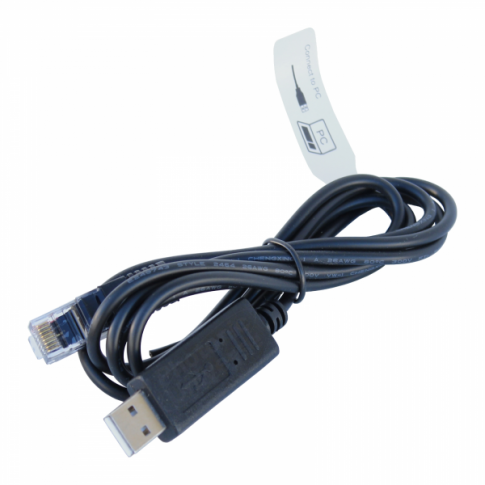
RJ45 to USB cable to connect a solar charge controller to a PC / computer (1.5m length)
RJ45 to USB cable to connect a solar charge controller to a PC / computer (1.5m length)
SKU:PTR-USB
Our stock levels are dynamic and can change frequently. If a product appears to be in stock, it may have already sold out. Please contact us if you have any questions about availability. Thank you for your understanding.
Couldn't load pickup availability
PTR-USB Communication Cable
RS485 RJ45 to USB PC Link Adapter
The PTR-USB communication cable is an essential accessory for managing and monitoring your solar power system. Specifically designed for Photonic Universe MPPT and PWM solar charge controllers, this cable bridges the gap between your controller’s RJ45 port and your PC or laptop's USB port.
Using this cable unlocks advanced functionality through free Windows-based software, allowing users to monitor live data, track performance statistics, and personalize charging parameters to suit specific battery types and load requirements.
Key Features
- ✔ Real-time system monitoring
- ✔ Custom charging stage programming
- ✔ High-speed RS485 communication
- ✔ Plug-and-play USB interface
- ✔ Durable 1.5m cable length
Technical Specs
| SKU / MPN | PTR-USB |
| Interface A | USB Type A (Male) |
| Interface B | RJ45 (8-Pin) |
| Protocol | RS485 |
| Cable Length | 1.5 Meters |
| OS Support | Windows OS |
Compatibility / Fitment Guide
| System Brand | Device Type | Notes |
|---|---|---|
| Photonic Universe | MPPT Solar Controllers | Fits all models with RJ45/RS485 port |
| Photonic Universe | PWM Solar Controllers | PU Series with communication support |
| Aftermarket Solar | Universal RS485 Interface | Verify pinout before use on non-PU devices |
OEM Cross Reference
| Photonic Universe | PTR-USB |
| EPEVER / EPsolar Equivalent | CC-USB-RS485-150U |
Installation Guide
1. Connect the RJ45 end to the "RS485" or "COM" port on your solar controller.
2. Plug the USB end into an available port on your Windows PC.
3. Install the appropriate "Solar Station" or manufacturer-specific monitoring software.
4. Select the correct COM port within the software settings to begin data synchronization.
Questions & Answers
Is this a genuine original part?
This is a high-grade solarika / Aftermarket replacement cable manufactured to meet the exact technical specifications of the original PTR-USB communication cable.
How do I know if it is compatible?
If your solar charge controller has an RJ45 port labeled "RS485" and you are using a Photonic Universe or EPEVER system, this cable is the standard link for PC communication.
Can I leave this cable connected permanently?
Yes, the cable is designed for long-term connection to a dedicated monitoring PC or logging device within your vehicle or boat electrical system.
Note: Software is not included with the cable but can be downloaded from the manufacturer's website. Please verify your controller model before purchase.
Share