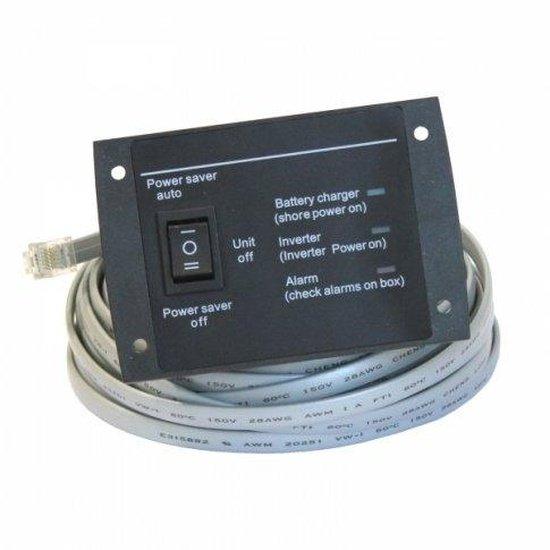
Remote switch for all Low Frequency inverters - LK2000, LK3000, LK6000 series
Remote switch for all Low Frequency inverters - LK2000, LK3000, LK6000 series
SKU:LKSWITCH
Our stock levels are dynamic and can change frequently. If a product appears to be in stock, it may have already sold out. Please contact us if you have any questions about availability. Thank you for your understanding.
Couldn't load pickup availability
Remote Switch for Photonic Universe Low Frequency Inverters
LKSWITCH | Remote Monitoring & Control | Power Saver Modes
The Photonic Universe LKSWITCH is a dedicated remote control unit designed for all Photonic Universe LK Series low frequency inverters, including 12V, 24V, and 48V models. This essential accessory provides convenient remote monitoring and control, allowing you to manage your inverter's operation from a distance.
Equipped with a 5-meter extension cable, the LKSWITCH offers flexible placement, making it an ideal solution for installations where the inverter compartment is inaccessible or space is limited. It features three distinct operational settings and clear indicator lights for comprehensive system status at a glance.
COMPATIBILITY NOTE: Exclusively designed for Photonic Universe LK Series low frequency inverters (LK2000, LK3000, LK6000 series).
Key Features
| ▶ Remote Inverter Control — Conveniently switch your inverter on/off and manage power modes from a distance. |
| ▶ Energy Saving Modes — Utilise 'Power saver auto' to reduce idle power consumption when no load is detected. |
| ▶ Clear Status Indicators — Three LED lights provide instant feedback on battery charging, inverter power, and alarm status. |
| ▶ Extended Reach — Supplied with a generous 5-meter cable for flexible positioning and optimal accessibility. |
| ▶ Simple Installation — Designed for straightforward plug-and-play connection to compatible LK Series inverters. |
Technical Specifications
| Parameter | Value |
|---|---|
| Dimensions (L x W x H) | 90 x 60 x 20 mm |
| Weight | 500 g |
| Extension Cable Length | 5 metres |
| Connector Type | RJ12 |
Inverter Control Modes
| Setting | Description |
|---|---|
| Power Saver Auto | Activates the inverter and automatically switches to sleep mode when no load is detected, conserving energy. |
| Power Saver Off | Keeps the inverter running at full power continuously, regardless of the connected load. |
| Unit Off | Completely switches the inverter off, disconnecting power output. |
Typical Applications
| Application | Description |
|---|---|
| Off-Grid Systems | Ideal for remotely managing inverters in cabins, sheds, workshops, or other off-grid installations. |
| Motorhomes & Caravans | Provides convenient control of the vehicle's power system from the living area. |
| Marine Vessels | Enables accessible inverter operation on boats and yachts, especially when the inverter is installed in an engine bay or locker. |
| Inaccessible Inverter Locations | Perfect for situations where the inverter is installed in a hard-to-reach compartment, allowing for easy operation. |
Operational Indicators & Control
The LKSWITCH features three distinct indicator lights to provide real-time feedback on your inverter's status. These include indicators for battery charging status, inverter power status (on/off), and alarm status, ensuring you are always informed about your system's operation.
Common Questions
Which inverters is this remote switch compatible with?
This remote switch is specifically designed for Photonic Universe LK Series low frequency inverters, including the LK2000, LK3000, and LK6000 series, across all 12V, 24V, and 48V models.
What does the 'Power saver auto' mode do?
In 'Power saver auto' mode, the inverter will automatically enter a low-power sleep state when no load is detected. This helps to reduce the inverter's idle power consumption, saving energy.
What is the length of the extension cable?
The LKSWITCH comes with a 5-meter (approximately 16.4 feet) extension cable, providing ample length for flexible installation.
How is the remote switch connected to the inverter?
The remote switch connects to the inverter via an RJ12 connector. Installation typically involves removing the existing switch from the inverter, disconnecting its short cable, and then plugging in the 5m cable from the new remote switch.
Installation Notes
- Ensure the inverter is powered off and disconnected from all power sources before attempting installation.
- Refer to your Photonic Universe LK Series inverter manual for specific instructions regarding remote switch port location and connection.
- The remote switch is designed for simple plug-and-play installation, replacing the existing switch on the inverter.
- Position the remote switch in a convenient, easily accessible location using the provided 5-meter cable.
Before You Buy
- Verify Inverter Model: Confirm your inverter is a Photonic Universe LK Series low frequency model (e.g., LK2000, LK3000, LK6000 series).
- Voltage Compatibility: This switch is compatible with all 12V, 24V, and 48V LK Series inverters.
- Check Existing Port: Ensure your inverter has the appropriate RJ12 remote switch port.
- Cable Length: Consider if the 5-meter cable length is sufficient for your desired remote placement.
Please ensure this remote switch is compatible with your specific inverter model before purchase. Specifications are subject to change by the manufacturer.
Share