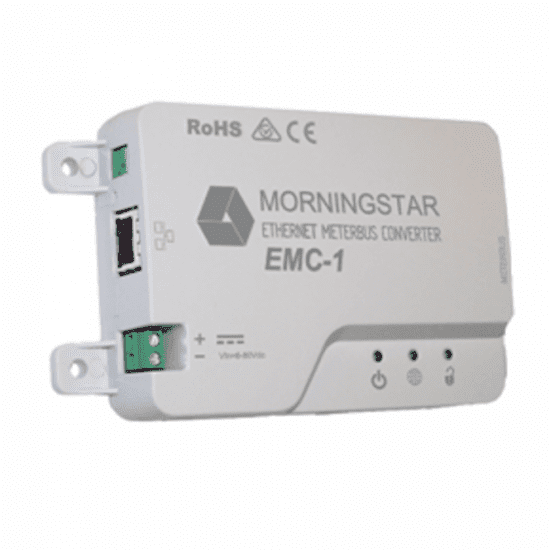
Morningstar EMC-1 Ethernet Meterbus Converter for remote monitoring of Morningstar controllers
Morningstar EMC-1 Ethernet Meterbus Converter for remote monitoring of Morningstar controllers
SKU:EMC-1
Our stock levels are dynamic and can change frequently. If a product appears to be in stock, it may have already sold out. Please contact us if you have any questions about availability. Thank you for your understanding.
Couldn't load pickup availability
Morningstar EMC-1 Ethernet Meterbus Converter
Remote Monitoring & Control for Morningstar Solar Charge Controllers & Inverters
The Morningstar EMC-1 Ethernet Meterbus Converter is an essential network peripheral designed to enable advanced remote monitoring and control for compatible Morningstar solar charge controllers and inverters. This robust converter bridges the gap between your solar system's MeterBus (RJ-11) or RS-232 communication ports and modern IP-based networks, including local area networks (LAN) and the internet. It allows users to access real-time data, configure settings, and manage their solar installations from virtually anywhere.
Ideal for off-grid homes, remote installations, and commercial solar systems, the EMC-1 facilitates comprehensive system oversight, data logging, and custom programming via Morningstar's MSView PC software and LiveView web interface.
COMPATIBILITY NOTE: Designed for Morningstar controllers and inverters with an RJ-11 MeterBus port. Verify your Morningstar device's port type before purchase.
Key Features
| ▶ Remote Monitoring & Control — Access system data and settings via LAN or internet. |
| ▶ LiveView Web Interface — Real-time data, faults, and alarms displayed in a browser. |
| ▶ MSView PC Software Support — Detailed data analysis, graphical displays, and customisation. |
| ▶ Cloud-Hosted Data Service — Facilitates access to Morningstar's official cloud data backup. |
| ▶ Wide Operating Voltage — Compatible with 12V, 24V, and 48V systems (8-80Vdc input). |
| ▶ Robust Design — Operates effectively in harsh environments (-40°C to +60°C). |
| ▶ Auto-Detection & Configuration — Simplifies setup with compatible Morningstar devices. |
| ▶ Multiple Protocols — Supports MODBUS TCP/IP, SNMP, and HTTP for versatile integration. |
Technical Specifications
| Parameter | Value |
|---|---|
| DC Input Voltage Range | 8-80 Vdc |
| Maximum Self-Consumption | ~2 Watts |
| Communication Ports | MeterBus (RJ-11), Ethernet (RJ-45) |
| COM Protocols | Morningstar MeterBus, MODBUS TCP/IP, SNMP, HTTP |
| Ethernet Speed | 10/100Base-T |
| Operating Temperature Range | -40°C to +60°C |
| Storage Temperature Range | -55°C to +80°C |
| Humidity | 100% non-condensing |
| Dimensions (H x W x D) | 153 x 86 x 30 mm |
| Weight | 0.13 kg |
| Mounting | 35mm DIN rail or Surface Mount |
Connectivity & Monitoring Features
| Feature | Description |
|---|---|
| MeterBus to Ethernet Conversion | Transforms the RJ-11 MeterBus port of compatible Morningstar devices into a fully functional Ethernet port (RJ-45) for network integration. |
| LiveView Web Pages | Provides a simple, browser-based dashboard for real-time system status, data, faults, and alarms without requiring software installation. |
| MSView PC Software Integration | Enables in-depth data analysis, custom battery charging parameters, automatic data logging, and remote configuration via a Windows-based application. |
| Cloud Data Service Ready | Facilitates connection to Morningstar's cloud-hosted data service for easy access to historical data logs and system performance metrics. |
| Broad Protocol Support | Supports MODBUS TCP/IP for industrial control, SNMP for detailed system polling, and HTTP for web-based monitoring. |
Typical Applications
| Application | Description |
|---|---|
| Off-Grid Solar Systems | Enables remote monitoring and management of charge controllers and inverters in cabins, remote homes, or rural electrification projects. |
| Industrial & Commercial Sites | Facilitates integration into SCADA systems and industrial automation for critical power systems and telecom stations. |
| RV, Marine & Mobile Applications | Allows convenient monitoring of solar charging and battery status from a connected device, enhancing user experience. |
Certifications & Robust Design
The Morningstar EMC-1 is designed for reliability in demanding solar environments. It is CE, RoHS, FCC Class B, and C-Tick RCM compliant, ensuring it meets international standards for safety and electromagnetic compatibility. Manufactured in an ISO 9001 certified facility, the EMC-1 features a robust plastic enclosure and supports DIN-rail mounting for secure installation. Its wide operating temperature range of -40°C to +60°C and 100% non-condensing humidity rating underscore its suitability for harsh off-grid conditions.
Common Questions
What Morningstar devices are compatible with the EMC-1?
The EMC-1 is compatible with Morningstar products that feature an RJ-11 MeterBus port. This includes many TriStar PWM (e.g., 45A, 60A), TriStar MPPT (e.g., 30A, 45A, 60A), SunSaver Duo, ProStar (Gen3), SunSaver MPPT, and SureSine Inverter models. Always check your specific Morningstar device's manual for MeterBus port availability.
What is included with the Morningstar EMC-1?
The package typically includes the EMC-1 converter unit, an Ethernet cable, positive and negative battery cables for power, a Y-cable with 2x RJ-11 and 1x RS-232 connections, and four #10 cross-head screws for mounting. A detailed instruction manual is also supplied.
Does the EMC-1 require an external power supply?
The EMC-1 can be powered from the Morningstar product's MeterBus port, but an external 8-80 Vdc power supply (such as an AC-DC converter or system battery) connected to the EMC-1's power input is recommended for a constant, reliable power source, especially under all operating conditions.
Can I use the EMC-1 with a Mac-based system?
Yes, the EMC-1 is compatible with Apple-based computer systems for web-based monitoring via LiveView. For detailed configuration and data analysis using MSView software, a Windows-based PC is typically required.
Installation Notes
- Ensure all power is disconnected from the Morningstar device and the EMC-1 before making any connections.
- Mount the EMC-1 in a location protected from direct sunlight, high temperatures, corrosive fumes, and water. Avoid confined areas where battery gases may accumulate.
- Connect the MeterBus (RJ-11) cable from the EMC-1 to the compatible Morningstar device.
- Connect the Ethernet (RJ-45) cable from the EMC-1 to your local network or router.
- Provide an 8-80 Vdc power supply to the EMC-1 via its dedicated power input terminals for optimal performance. If using external power, a 5 Amp fuse on the positive wire is recommended.
Before You Buy
- Check Compatibility: Confirm your Morningstar charge controller or inverter has an RJ-11 MeterBus port.
- Network Requirements: Ensure you have an available Ethernet port on your router or network switch for connection.
- Power Source: Consider if an external 8-80 Vdc power supply will be used for the EMC-1, in addition to power from the MeterBus port.
- Software Needs: Determine if you require the full functionality of MSView (Windows PC) or if web-based LiveView monitoring is sufficient.
- Installation Environment: Plan a suitable, protected mounting location for the EMC-1.
Please verify all specifications and compatibility with your existing system components before purchase. The Morningstar EMC-1 comes with a 5-year manufacturer's warranty.
Share