
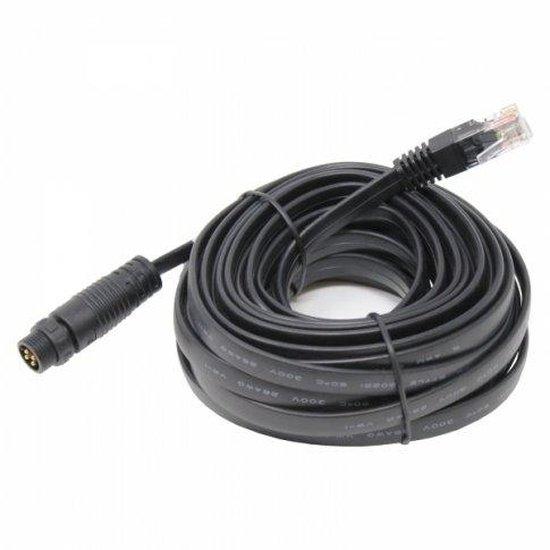
7m RS485 to RJ45 cable to connect a waterproof solar charge controller to a remote display/Wi-Fi module
7m RS485 to RJ45 cable to connect a waterproof solar charge controller to a remote display/Wi-Fi module
SKU:BW7MT50
Our stock levels are dynamic and can change frequently. If a product appears to be in stock, it may have already sold out. Please contact us if you have any questions about availability. Thank you for your understanding.
Couldn't load pickup availability
7m RS485 to RJ45 Communication Cable
For Photonic Universe Waterproof Solar Charge Controllers | Remote Monitoring & Programming
This 7-meter RS485 to RJ45 communication cable is specifically designed to connect compatible Photonic Universe waterproof solar charge controllers to a remote display or Wi-Fi module. It provides a reliable data link, enabling comprehensive monitoring and advanced programming of your solar power system parameters.
By facilitating communication between your charge controller and a remote interface, this cable unlocks greater control and visibility over your solar setup, whether for off-grid applications, RVs, boats, or small home installations.
COMPATIBILITY NOTE: This cable is designed exclusively for specific Photonic Universe waterproof solar charge controllers.
Key Features
| ▶ Remote Monitoring — Access real-time solar system data from a distance. |
| ▶ Advanced Programming — Customise battery types, charging stages, and load settings. |
| ▶ 7-Meter Length — Offers flexible placement for remote displays or Wi-Fi modules. |
| ▶ RS485 to RJ45 — Ensures reliable and stable data communication. |
| ▶ Photonic Universe Specific — Optimised for seamless integration with compatible controllers. |
Technical Specifications
| Parameter | Value |
|---|---|
| Cable Length | 7 meters |
| Connector Type 1 | RS485 |
| Connector Type 2 | RJ45 |
| Product Type | Communication Cable |
| SKU | BW7MT50 |
Enhanced System Control & Monitoring
Connecting your Photonic Universe waterproof solar charge controller to a remote meter or Wi-Fi module via this cable provides access to a wide range of monitoring and programming capabilities, including:
| Function | Description |
|---|---|
| Parameter Monitoring | View real-time data such as solar panel voltage/current, load current, and battery state of charge. |
| Battery Management | Edit battery type and capacity, choose charging voltages for different stages, and specify stage durations. |
| User-Defined Battery | Create custom battery types with specific charging parameters if standard options are unsuitable. |
| Load Customisation | Customise 'load' settings, including setting timers for connected devices like lighting, fans, or pumps. |
Typical Applications
| Application | Description |
|---|---|
| Off-Grid Systems | Ideal for remote monitoring of charge controllers in cabins, sheds, RVs, caravans, and boats. |
| Home Solar Installations | Provides convenient access to system data and settings without needing to access the controller directly. |
| Small Business & Workshops | Enables effective management and optimisation of solar power systems for various small-scale commercial uses. |
Compatibility & Integration
This 7m RS485 to RJ45 cable is specifically designed for use with Photonic Universe waterproof solar charge controllers. It is compatible with models such as the PU1024BW and other controllers within the compatible Photonic Universe waterproof series that utilise an RS485 communication port with an RJ45 connector for remote accessories. This cable facilitates connection to Photonic Universe remote meters or Wi-Fi modules, allowing for comprehensive system monitoring and customisation.
Common Questions
What is the primary use of this cable?
This cable is used to connect a compatible Photonic Universe waterproof solar charge controller to a remote display unit or a Wi-Fi module, enabling remote monitoring and programming of your solar system.
Is this cable compatible with all solar charge controllers?
No, this cable is specifically designed for use with certain Photonic Universe waterproof solar charge controllers that feature an RS485 communication port with an RJ45 interface. It is not universally compatible with all brands or models of charge controllers.
What kind of data can I monitor with this connection?
You can monitor various charging parameters such as solar panel voltage and current, load current, battery voltage, battery state of charge, and more, depending on the capabilities of your remote display or Wi-Fi module.
What are the benefits of remote programming?
Remote programming allows you to customise critical settings like battery type, charging voltages for different stages, duration of charging stages, and load control timers, providing enhanced control over your solar power system's operation.
Installation Notes
- Ensure the solar charge controller is powered off before connecting or disconnecting the cable.
- Carefully align the RS485 and RJ45 connectors with their respective ports to avoid damage.
- Secure the cable to prevent accidental disconnections or strain on the ports.
- Route the cable away from sharp edges, high-heat sources, and areas of potential physical damage.
- Refer to your Photonic Universe charge controller and remote accessory manuals for specific connection instructions.
Before You Buy
- Verify Controller Model: Confirm your Photonic Universe waterproof solar charge controller is compatible with an RS485 to RJ45 communication cable.
- Check Port Types: Ensure your controller has an RS485 communication port and your remote display/Wi-Fi module uses an RJ45 input.
- Measure Length: Confirm the 7-meter length is sufficient for your intended installation distance between the controller and the remote accessory.
- Consult Manuals: Always refer to your specific controller and accessory manuals for detailed compatibility and connection requirements.
Please verify all specifications and compatibility requirements with your existing solar equipment before purchase. Product details are subject to manufacturer specifications.
Share
